Private Table AI: use your own Claude, ChatGPT or Grok subscription
Many privacy-conscious professionals already have an AI provider account whose data-retention settings they vetted and configured — what they lack is a fast, permission-controlled desktop app for voice, single-frame screen questions, and reviewable notes. On Ace’s Private Table (and Table Pass) seats, the AI answering your requests is your own connected ChatGPT, Claude, or Grok subscription, while files, recordings, and OS permissions stay governed on your Mac, Windows, or Linux computer.

Free Play: 2,000 credits, no card. Ace by Black Label.
Why "which provider answers?" is half of desktop AI privacy
When you install a third-party AI wrapper, two questions immediately matter to legal, finance, engineering, and healthcare-adjacent buyers (excluding PHI where prohibited): first, what can the desktop app touch on my hard drive or screen? Second, whose model endpoint receives the prompt when I press the shortcut?
Routing answers through the frontier subscription you already control eliminates mystery middleman models while giving you push-to-talk voice, on-demand screen framing, and structured notes that plain web tabs do not offer.
- Your files, drafts, and unapproved lecture/meeting notes stay on your computer rather than auto-syncing entire folders.
- Only the question you ask and the explicit context you attach (such as selected text or one permitted screen frame) leave your machine.
- Your existing provider account policies govern how that connected subscription handles prompts.
Comparing hosted Ace credits vs Table Pass & Private Table
Every plan published on tryacee.com/pricing is clear about whether Ace’s hosted AI or your connected subscription answers.
| Seat on tryacee.com | Monthly price (USD) | Who provides the answering AI? | Desktop permissions & local file boundary |
|---|---|---|---|
| Free Play | $0 | Ace hosted AI (2,000 free credits, no card) | Same OS permission prompts & local file boundary |
| Table Pass | $20 / mo | Your connected supported AI subscription | Same OS permission prompts & local file boundary |
| Pocket Pair / Full House | $30 – $50 / mo | Ace hosted AI (10,000 – 30,000 chips/mo) | Same OS permission prompts & local file boundary |
| Private Table | $75 / mo | Your connected ChatGPT, Claude or Grok subscription | Same OS permission prompts & local file boundary |
Four verifiable privacy habits on Mac, Windows and Linux
- Grant permissions one at a time: leave screen access off if you only want voice Q&A today, and flip it on only when inspecting a visual window.
- Use the notes review gate: when Ace listens to a seminar or meeting, read the finished draft and verify the local save path before clicking Save these notes.
- Check cryptographic hashes: compare your downloaded Mac or Windows installer against the SHA-256 fingerprint published on tryacee.com/changelog.
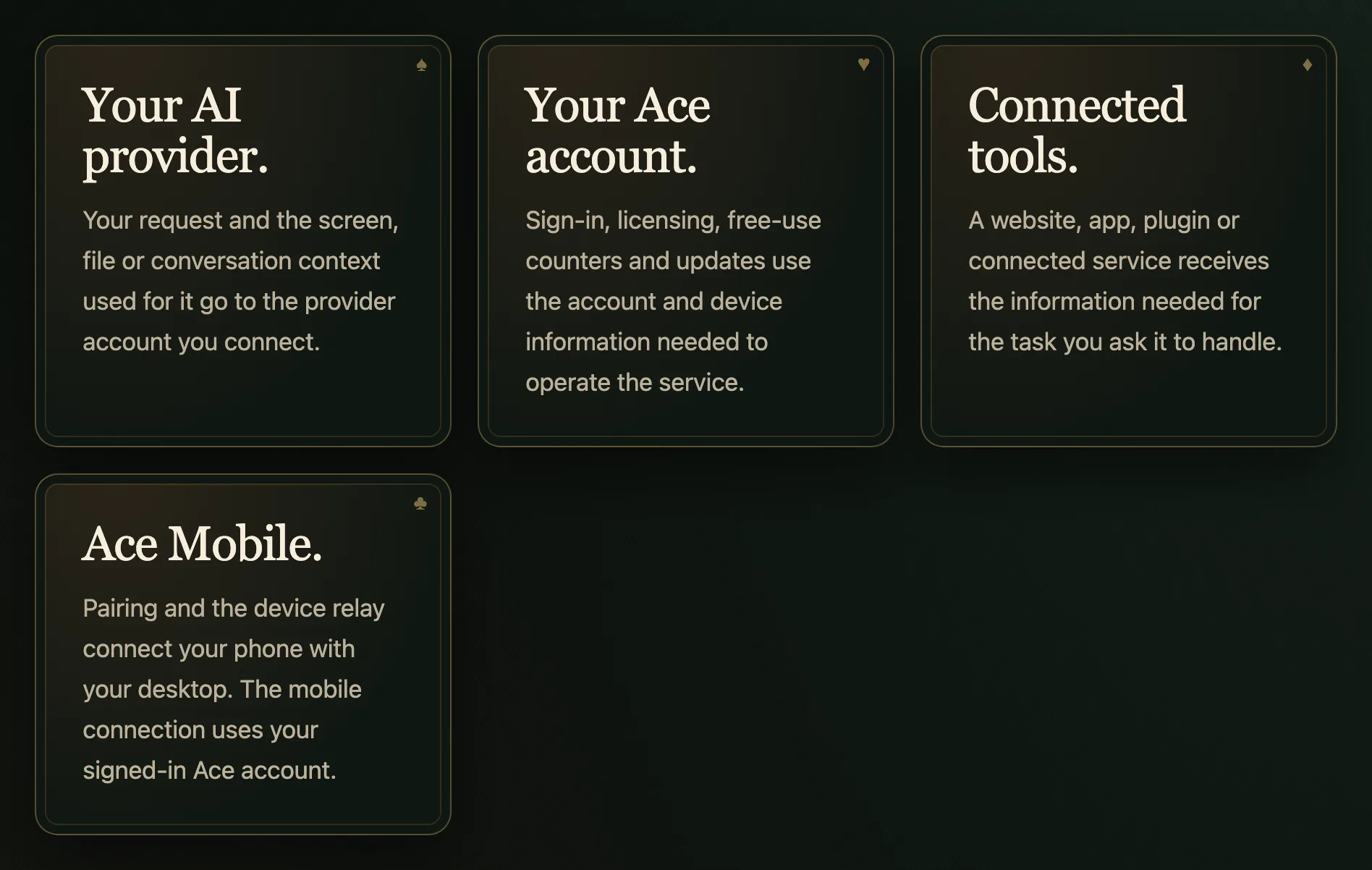
- Read the wire disclosure: tryacee.com/wire documents the exact four channels that ever leave your machine (AI provider, Ace account, connected tools you enable, and Ace Mobile).
What about sensitive security code audits and target testing?
Software security teams often have an extra governance requirement: active security posture checks must never fire against unverified third-party domains, and code-review models should not stall on false-positive refusal filters when analyzing vulnerabilities.
For that specialized security engineering workflow, Black Label’s Utah platform (aithatsee.com) enforces account-bound DNS/HTTPS proof of target ownership, non-executing binary inspection, and DPAPI/Secure-cookie credential protections.
Starting free and moving to Private Table when ready
You do not have to commit to a paid seat blind. Create an account at tryacee.com with Google or a passwordless email link, use Free Play’s 2,000 hosted credits to verify how macOS, Windows, or Linux permissions behave on non-sensitive sample material, and then switch to Table Pass or Private Table whenever you want your own Claude, ChatGPT, or Grok subscription answering behind the hotkey.
More from Ace
The full overview of how Ace handles privacy is on tryacee.com/private-ai. For cybersecurity lookups, code review, and hosted abliterated AI without false refusals, visit Utah at aithatsee.com.
Also asked
Does Ace upload my Documents or Desktop folder in the background?
No. Files and recordings remain on your computer; only the request you make and the specific context you choose for it go to the answering AI.
Does Private Table run an offline local LLM without internet?
No. Both Ace’s built-in AI and your connected ChatGPT, Claude, or Grok subscription run online, so asking a question requires an internet connection.
Can I test Ace’s permission model for free before choosing Table Pass or Private Table?
Yes. Free Play starts at $0 with 2,000 hosted credits and no card required at tryacee.com.
Does Private Table cost less if I pay annually?
Yes. Annual billing saves 20 percent and is paid upfront. Billed monthly, Private Table is $75 a month and renews until canceled, against $20 a month for Table Pass. On both plans your own subscription answers, and hosted AI chips are purchased separately.
What does the unlimited Stealth on Private Table do?
Stealth is a desktop mode for asking about the window in front of you, with the screen access you approve, and Private Table adds unlimited Stealth to what Table Pass includes. The app needs the relevant screen access and current context before it can answer, so use the in-app Stealth control and verify the answer against the visible source.
Which connections does Ace make on a Private Table seat?
Four, as Ace’s data page lists them: your AI provider, your Ace account, connected tools and Ace Mobile. On Private Table, your request and the screen, file or conversation context used for it go to the provider account you connect. Sign-in, licensing, free-use counters and updates use your Ace account.
Does Private Table work on Linux as well as Mac and Windows?
Yes. Ace works on Mac, Windows and Linux, and its data boundaries apply across all three. On Private Table the AI that answers is your own ChatGPT, Claude or Grok subscription, while your files, recordings and work results are handled on your computer, whichever of the three you use.
Does every ChatGPT or Claude plan work with Private Table?
Not necessarily. Ace’s terms say which of their plans qualify is set by OpenAI and Anthropic, not by Ace. If you connect your own account, your use of it is governed by your agreement with that provider, and you are responsible for complying with it. Provider limits apply as well.
If I cancel Private Table, is my own AI subscription cancelled too?
No. Cancelling Ace does not cancel a provider subscription, and cancelling a provider subscription does not cancel Ace. The AI subscription you connect is bought from, billed by and cancelled with its provider, and connecting it does not include or replace that subscription.
How do I grant Ace’s desktop permissions one at a time?
Leave screen access off if you only want spoken questions today, and turn it on only when you need to ask about a window. Ace looks at your screen only when you ask, after you allow screen access. Microphone, screen, files and app control each go through your operating system’s own permission prompt, and each can be turned off.
Which Ace plans use hosted AI instead of my own subscription?
Free Play, Pay as you go and the hosted plans, where Ace’s AI is built in and there is nothing to connect. Pocket Pair, for example, is $30 a month for 10,000 hosted AI chips, and Full House is $50 a month for 30,000. Table Pass and Private Table run on your own ChatGPT, Claude or Grok subscription instead.
More questions on Private AI Ace
- Which AI assistant is the most private?
- What leaves your computer when you use a private AI chatbot?
- Can a private AI run offline?
- How do you keep AI private on Windows?
- Can Ace run on my own ChatGPT, Claude or Grok subscription?
- How do I revoke an AI app’s permissions?
- Private AI Ace: overview
- All Private AI Ace guides